Example: Heat Equation
We will now consider the heat equation as an example for a simple PDE. The heat equation is a PDE that describes how the temperature of a material changes over time. In one dimension, the heat equation is:
where \(u(x, t)\) is the temperature of the material at position \(x\) and time \(t\), and \(D\) is the thermal diffusivity of the material. Please refer to the Diffsol heat equation example for the derivation of the diffsol model.
We can solve the one-dimensional heat equation using Diffsol with the following code:
import numpy as np
import matplotlib.pyplot as plt
from matplotlib import cm
import pydiffsol as ds


def solve():
    ode = ds.Ode(
        """
        D { 0.1 }
        h { 1.0 / 21.0 }
        g { 0.0 }
        m { 1.0 }
        A_ij {
            (0..20, 1..21): 1.0,
            (0..21, 0..21): -2.0,
            (1..21, 0..20): 1.0,
        }
        b_i {
            (0): g,
            (1:20): 0.0,
            (20): g,
        }
        u_i {
            (0:5): g,
            (5:15): g + m,
            (15:21): g,
        }
        heat_i { A_ij * u_j }
        F_i {
            D * (heat_i + b_i) / (h * h)
        }
        out_i {
            u_i
        }
        """,
        # Note that faer_sparse may be a better choice than nalgebra_dense for
        # larger systems because the RHS Jacobian will mostly be zeroes.
        ds.nalgebra_dense,
    )
    params = np.array([])
    ys, ts = ode.solve(params, 0.1)

    fig, ax = plt.subplots(subplot_kw={"projection": "3d"})
    ax.plot_surface(
        *np.meshgrid(ts, np.arange(ys.shape[0])), ys, # X, Y, Z
        cmap=cm.coolwarm,
    )
    ax.grid(False)
    ax.view_init(15, -30, 0)
    ax.set_box_aspect(None, zoom=1.2)
    ax.set_xlabel("t")
    ax.set_ylabel("h")
    ax.set_zlabel("T")
    fig.savefig("docs/images/heat_equation.svg")
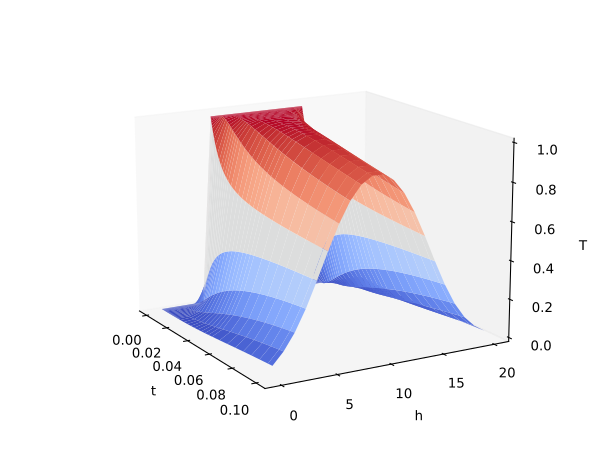
The plot of the solution is:
Let’s demonstrate calculating two variables by adding the temperature in celcius to the output of the model. This can be done by adding one line to the out_i section in the model:
out_i {
    u_i,
    u_i - 273.15
}
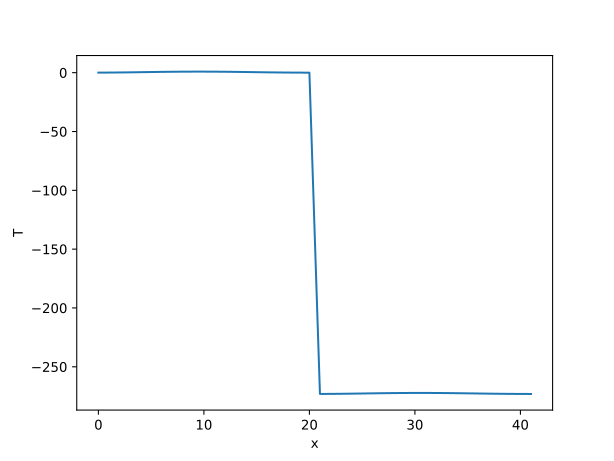
If we change to a regular 2D plot and render just the last column:
ax.plot(ys[:,-1], label="x")
The plot shows the output from the two values concatenated. Instead of having 21 values it has doubled to 42, with celcius on the left and kelvin on the right:
When working with multiple outputs, be mindful the solve result is always a 2D array and one must manually split the array to separate the variables.